Set it and forget it: Automated scheduling for content blocks
Say goodbye to manual updates and midnight logins with our new automated scheduling feature for content blocks. Log a support ticket to get access to scheduling block content.
What it is
The Block Scheduler is a powerful new configuration tool that allows you to set precise "publish" and "expiration" dates for individual content blocks. It transforms static components into time-sensitive assets that appear and disappear exactly when you need them to.
How it works
Once enabled, you can manage transitions directly within the block editor:
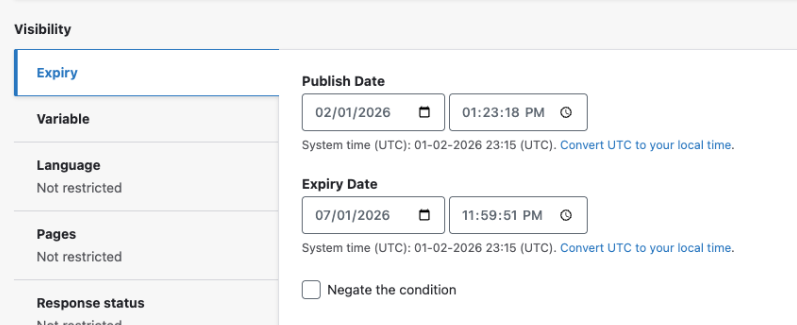
- Configure: Find the new "Expiry" tab within the visibility section of any block. Enter your desired start and end times based on your site’s local timezone (found in Regional Settings).
- Toggle: Need to pause the schedule? Check "Negate the condition" to override the timing without deleting your dates.
- Deploy: Hit "Save block" to lock in your automated schedule.
Why it matters
Consistency is key to a professional user experience, but manual content swaps are prone to human error and "content rot." Whether it’s an urgent alert for holiday hours, a limited-time promotion, or a seasonal banner, this feature allows you to plan ahead and automate your workflow. It ensures your site remains relevant and up-to-date without requiring a team member to be online the moment a campaign starts or ends.

Related Help Content
 HealthHub
Release notes: April 28, 2026
Headline and Media Marquee: This update resolves a routing error and layout conflict in the Headline and ...
HealthHub
Marketing Toolkits
Use these ready-made materials to ignite your content marketing:Social media postsBlog postsInfographics...
HealthHub
Release notes: March 26, 2026
HealthHub, ahora en Español: explore your health in your languageHealthHub has evolved from simple artic...
HealthHub
Release notes: May 14, 2026
Content-aware language switcher: We have enhanced the language switcher logic in the page title marquee t...
HealthHub
Accessibility support
WebMD Ignite is committed to providing health content and solutions that are relevant, relatable, and hel...
HealthHub
Release notes: January 15, 2026
Pinpoint and fix deleted or unpublished content — Missing Content Reference ReportWith the Missing Cont...